Paste this into your AI.
This prompt turns the guide into a supervised build. Your AI does the local work; you handle Zoom login, credentials, and final permission changes.
<task>
Build a local Zoom MCP server and an optional indexed memory layer for me.
Work with me until the connection is tested end to end.
</task>

<operating_rules>
- Inspect my machine, current folder, Python version, and available MCP clients first.
- Never ask me to paste Zoom credentials, tokens, or secrets into chat.
- Keep secrets in a local .env file that is excluded from Git.
- Use a dedicated Zoom Server-to-Server OAuth app.
- Request only scopes used by implemented tools.
- Start read-only unless I explicitly approve scheduling or update access.
- Do not add deletion scopes without a separate explanation and confirmation.
- Stop before changing Zoom permissions, rotating credentials, or submitting forms;
  put the correct screen in front of me and tell me exactly what will change.
- Use current official Zoom and MCP documentation when an API detail may have changed.
</operating_rules>

<tools_to_build>
Read tools:
- list upcoming meetings
- get one meeting
- list cloud recordings by explicit date range
- get recording files
- list AI meeting summaries by explicit RFC 3339 date range
- get one summary using the meeting-instance UUID
- get and download one retained transcript

Optional write tools, only after I approve them:
- create a meeting
- update a meeting
</tools_to_build>

<zoom_setup>
Guide me through creating and activating the Server-to-Server OAuth app.
Map every requested granular scope to one implemented tool.
Also verify these Zoom settings:
- Cloud recording
- Create audio transcript
- Meeting Summary with AI Companion
- retained meeting transcripts for use by other AI services
Explain that cloud recordings, AI summaries, and retained transcripts are separate API lanes.
</zoom_setup>

<implementation>
- Use Python and the official stable MCP Python SDK.
- Use a small, readable project with .env.example, requirements.txt, and README.md.
- Cache one-hour Zoom access tokens safely.
- Encode meeting UUIDs correctly for API paths.
- Return useful errors without printing credentials or private meeting content.
- Register the server with my chosen MCP client using absolute paths.
</implementation>

<verification>
Test each lane separately and report status codes plus counts, not private content:
1. token request
2. meeting list
3. summary list for the last seven days
4. summary detail for the newest meeting UUID
5. retained transcript metadata and download character count
6. cloud recordings for an explicit date range
If an endpoint returns zero results, inspect its date window and data type before
concluding that permissions are broken.
</verification>

<memory_layer>
After the MCP works, ask me to choose one destination:
1. SQLite with normalized tables and FTS5 search
2. OpenBrain with provenance and entity links
3. Markdown with YAML frontmatter and monthly indexes

Build an idempotent ingestion job that stores meeting UUID, meeting number, topic,
time, people/projects, summary, transcript location or content, decisions, actions,
source URL, content hash, and sync time. The AI should search this local index first
and call Zoom only for fresh, missing, or action-oriented data.
</memory_layer>

<finish_line>
The work is complete only when the MCP reconnects cleanly, the new tools appear in
the client, a real summary and transcript can be retrieved, the chosen local index
can answer a search query, and all created files and retest commands are documented.
</finish_line>
MCP handles access. Your index handles recall.
Scheduling and current account state belong in live tool calls. Summaries, transcripts, decisions, and action items should be normalized after the meeting so the AI does not rebuild context through the same chain of API calls every time.
Give each Zoom permission one job.
Create the app
At marketplace.zoom.us, choose Develop → Build App → Server-to-Server OAuth. Use one dedicated app for this integration.
Store credentials locally
Put the Account ID, Client ID, and Client Secret in .env. Never put them in the prompt, source code, screenshots, or setup documentation.
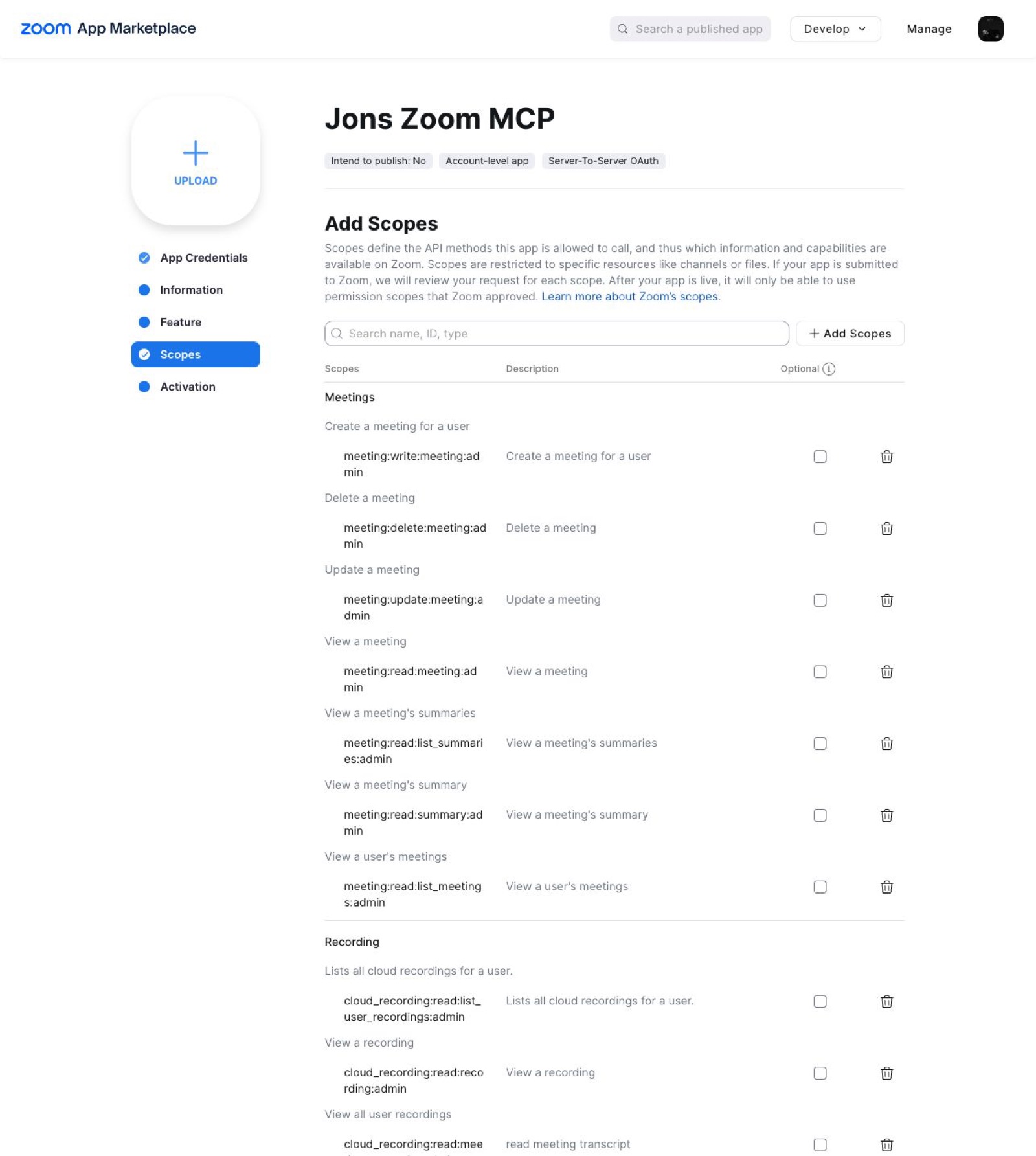
Add scopes
Use the table below. Omit create and update scopes for a read-only research MCP. Leave deletion out unless you have a concrete workflow and confirmation gate.
Generate the data
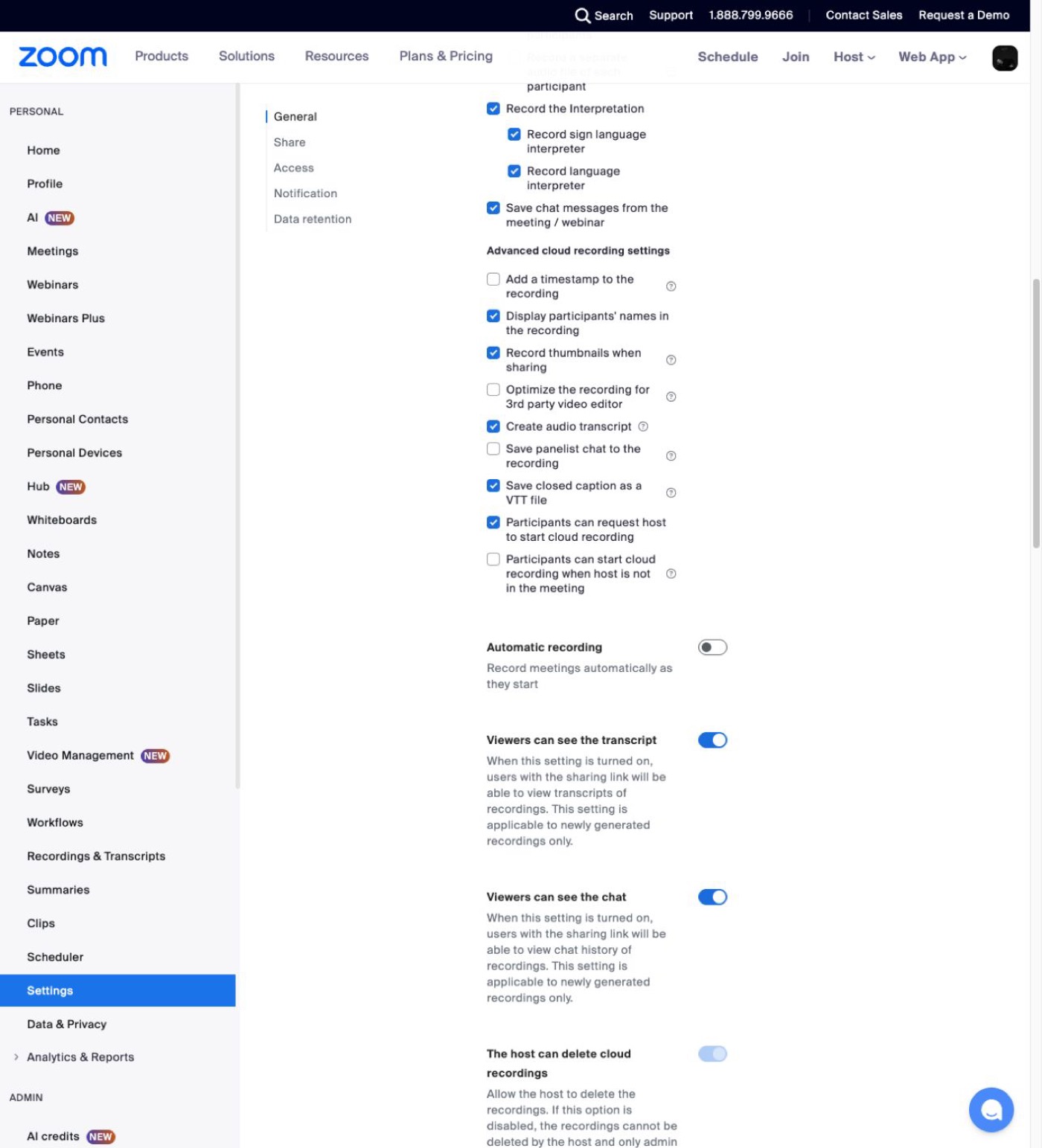
In Zoom Recording settings, enable Cloud recording and Create audio transcript. Enable Meeting Summary with AI Companion and retained transcripts for the summary-generated transcript lane.
Activate
The app must be active before it can request one-hour account-credential tokens.
| Job | Granular scope | Access |
|---|---|---|
| List meetings | meeting:read:list_meetings:admin | Read |
| View a meeting | meeting:read:meeting:admin | Read |
| Create meetings | meeting:write:meeting:admin | Optional |
| Update meetings | meeting:update:meeting:admin | Optional |
| List cloud recordings | cloud_recording:read:list_user_recordings:admin | Read |
| View recording files | cloud_recording:read:recording:admin | Read |
| List AI summaries | meeting:read:list_summaries:admin | Read |
| View one summary | meeting:read:summary:admin | Read |
| Download retained transcript | cloud_recording:read:meeting_transcript:admin | Read |
Install the small, boring server.
Download the starter, create a virtual environment, and register the absolute Python and script paths with your MCP client.
python3 -m venv .venv
.venv/bin/pip install -r requirements.txt
claude mcp add zoom -s user -- \
  /absolute/path/zoom-mcp/.venv/bin/python \
  /absolute/path/zoom-mcp/zoom_mcp.py
Restart or reconnect the client after changing the server. Past summary and transcript detail calls must use the meeting-instance UUID returned by the list endpoint, not merely the reusable meeting number.
Prove each Zoom data lane separately.
Token and meetings
Confirm the token request and meeting list return 200 without printing secrets.
Summaries
List summaries for an explicit RFC 3339 date range, then retrieve one summary by its returned instance UUID.
Retained transcripts
Retrieve transcript metadata and download the content with the OAuth bearer token.
Cloud recordings
Query an explicit date range. The default window is narrow, so a successful empty result does not prove the scope is broken.
Use the Zoom MCP to test meetings, summaries, retained transcripts,
and cloud recordings as separate data lanes. Use explicit date ranges.
Report status codes, result counts, and content character counts only.
Do not quote private meeting content or print credentials.
Choose where the meetings become memory.

SQLite
The default for one person and one machine: normalized tables, FTS5 search, sync state, and simple backups.
OpenBrain
Use when meetings should join a broader graph of people, projects, decisions, and provenance.
Markdown
Use one file per meeting with YAML frontmatter, stable filenames, and monthly indexes.
Make one lookup answer “what do we know?”
| Field | Purpose |
|---|---|
meeting_uuid | Immutable meeting-instance identity for detail calls. |
meeting_id | Reusable human-facing meeting number. |
topic + started_at | Scanning and date filtering. |
people / projects | Connections to the rest of your work. |
summary / transcript | Normalized content or stable local location. |
decisions / actions | High-value retrieval objects. |
source_url + synced_at | Provenance and freshness. |
content_hash | Change detection and idempotent sync. |
Search this index first. Load the relevant summary or transcript chunks. Return to Zoom only when the record is missing, stale, or an action must occur.
Download the working starter.
The ZIP includes the FastMCP server, safe environment template, requirements, normalized SQLite schema, ingestion script, and retest instructions.